
Searching Cases by Name
Begin with the office tied to the named court. The District Clerk holds district civil, family, juvenile, and felony files. The County Clerk keeps County Court misdemeanor, civil, probate, and guardianship records. Each Justice of the Peace and municipal clerk maintains its own lower-court docket. Send a request to the wrong Hardin County clerk. You may get no result even though the case exists elsewhere in the county.
For district cases, the District Clerk can help. It offers a civil and criminal name-search form for Hardin County. It requests a full name, any other known name, a date of birth, and the years to search. Share only what distinguishes the public case. The stated fee is $5 for each search.
- Read the court name on the notice or prior filing.
- Enter the surname first, then narrow a common result.
- Select the matching court and record type when filters appear.
- Compare the cause number and filed date before opening a result.
- Contact the responsible clerk if the index is unclear.
| Search detail | Type | Use |
|---|---|---|
| Full name | Text | Primary local match |
| Other known name | Text | Checks another filing name |
| Date of birth | Date | Separates similar names |
| Years searched | Range | Defines the local search period |
Hardin County Clerk Routes
District Clerk Dana Hogg serves the 88th and 356th District Courts from P.O. Box 2997, Kountze, TX 77625, with phone (409) 246-5150. County Clerk Connie Becton sits in Suite B-110 at 300 West Monroe Street, Kountze, and answers at (409) 246-5185. Both offices keep weekday hours of 8 a.m. to 5 p.m.
District Clerk
District felony, civil, family, juvenile, and tax cases
(409) 246-5150
County Clerk
County misdemeanor, civil, probate, and guardianship cases
(409) 246-5185
Justice and municipal cases take a different route. The official JP directory lists six precinct offices, and a city citation belongs with the municipal court printed on that paper.
Searching by Case Number
For a Hardin County case search, the cause number is the strongest key. Copy every digit, letter, hyphen, and leading zero exactly as written. No single format covers district, county, JP, and municipal cases. The cause number from the court notice controls.
When a portal rejects the number, check what the field actually asks for. Case, cause, citation, ticket, and docket number are different labels, and they are not interchangeable. Kountze and Silsbee payment screens accept several ticket references, and Lumberton offers a citation search. A District Clerk copy request needs a cause number. It also needs a precise description of the document.
Note: a number that works for payment may not open the full event history. It may still fail to reach the case file.
Hardin LGS Guest Search
Start at the LGS Online Records Search. The Hardin County Clerk links it for its docket records. You can enter as a guest or set up an account. From there, pick an office, a record type, and any filters. The help pages mention tools for more information, images, and a cart. Plenty of the fields are built for property records. So set the type to criminal, civil, or probate before you trust what a Hardin County court docket entry seems to say.
Cost works in two tiers. Index searches and guest previews cost nothing, while registered users can buy images. Per the official FAQ, a subscription becomes required after five court-case image purchases. Each purchase carries a $0.30 transaction fee. That fee is separate from what the clerk charges for a certified copy. Hardin County also cautions that the portal is a convenience, not the official court record.
Best use: locate the indexed item online, then ask the County Clerk when certification, authenticity, or a complete file matters.
What a Case Search Returns
A result may be an index row. It may be a posted court setting, a document image, or a detail screen. Each one answers a different question. The 88th and 356th District Court pages focus on hearings. LGS can display County Clerk index data and available images. re:SearchTX can show case, filing, document-text, and hearing details. That holds when a court has integrated its data and access is public.
| Cause number | The court identifier and best clerk-request key. |
|---|---|
| Case style | The caption or public names tied to the matter. |
| Filed date | The filing date, not always the next setting. |
| Case type | The category used to route the record. |
| Status | A procedural label to check against the signed order. |
| Hearing | Date, time, court, event type, and access note. |
An index row is not the whole file. Pleadings, exhibits, reporter records, judgments, and protected items may require separate requests to the clerk.
Hardin re:SearchTX Fields
re:SearchTX adds the statewide layer for a docket search. Its dashboard separates Cases, Filings, Text in Documents, and Hearings. The official guide describes many filters. They cover case number, location, type, status, filed date, party, filing data, hearing date, hearing type, and hearing status. Users can open available details, export results, and save searches.
Access is public and role based. Registering enables account tools, but it cannot override sealing or confidentiality. Coverage turns on court integration and migration. A recent setting may appear on a Hardin County page first. An older record needs a clerk search. The official statewide entry point lays out that access model.
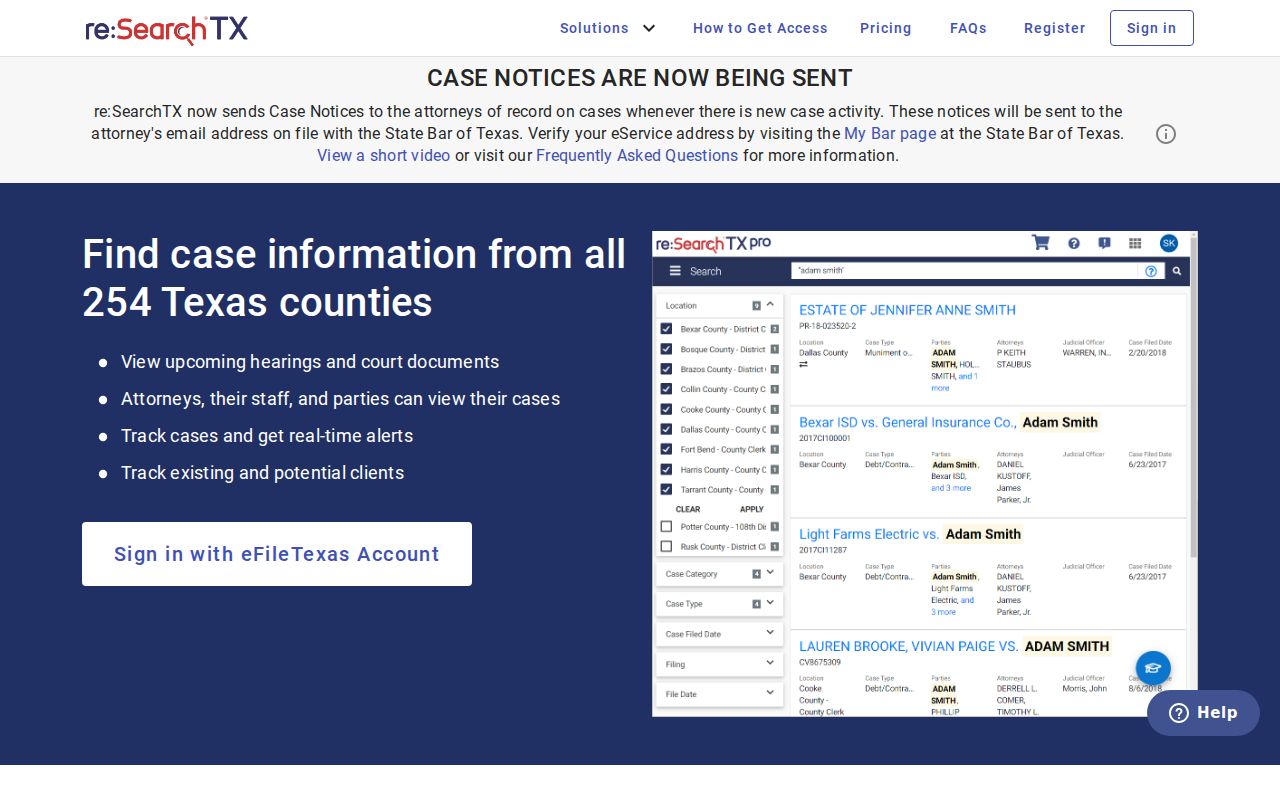
The screen is just a first step, and it does not promise that every Hardin County case is online.
Statewide vs County Case Search
Use both routes when the court is uncertain. The statewide tool helps locate a participating Texas court. For a known file, an official copy, or an item missing from the shared system, a local Hardin County clerk is the better stop. Neither one merges all district, county, JP, municipal, appellate, and federal records into a single court docket lookup.
| Point | re:SearchTX | Hardin County route |
|---|---|---|
| Scope | Participating Texas courts | One responsible clerk |
| Best key | Name, case, filing, or hearing | Cause number and court |
| Strength | Cross-court discovery | Confirmation and official copies |
| Limit | Integration and role vary | Files are split by office |
Federal matters run through PACER and the Eastern District of Texas, Beaumont Division, not a Texas state portal.
Hardin Posted Docket Searches
Need a court date fast? A posted docket is the quickest answer. The 88th District Court page puts out daily PDFs listing each setting. On the 356th District Court page, revised criminal settings sit in one place, covering arraignment, plea, pretrial, sentencing, motion to revoke, bench trial, and jury trial.
County Court posts its misdemeanor settings by category, and the probate page lists probate dates. Remember that these are calendars, not full histories. Do you need a pleading, judgment, exhibit, or certified file? Go from the setting to the right clerk. A Hardin County court-record request works best when it names the cause, court, document, and date.
Access and Restricted Cases
Public court information has limits online. Juvenile files, child-protection cases, adoptions, mental-health matters, sealed records, and protected personal data may be left out or blacked out. Family filings are sometimes public only in part. And a blank result can come from a misspelled name, a date filter set too tight, or asking the wrong office.
Texas law splits court records from ordinary agency records. Texas Government Code section 552.0035 keeps judiciary records outside the normal Texas Public Information Act request route. Rule 12 handles most judicial administrative records instead. The OCA open-records policy walks through that divide, while the case files themselves answer to court rules and other law.
Ask whether a missing item is sealed, confidential, redacted, not digitized, or held elsewhere. Each answer points to a different next step.
Restricted access runs through the court's own process, and a party to the case may hold rights the public does not. Ask the clerk what motion, authorization, identification, or order your situation needs. The clerk can tell you that without promising the access will follow.
Hardin County Case Search Fallbacks
No online tool replaces the clerk who holds the file. If the county portal is down, bring the details straight to the counter. That means the court name, cause number, case type, date range, and the document you want. The District Clerk lists email and fax contacts. Forms for a local search and copies are there too. Mail works for focused requests, with postage added when records come back that way. County Clerk questions can start by phone. Or go to Suite B-110. JP precincts accept forms by fax, email, or mail where their instructions permit.
Also ask for the right product. Inspection means viewing an available public file. A plain copy just reproduces a document. A certified copy carries the clerk's formal certification, and a docket search finds case activity while a setting check confirms the next hearing. Naming the product keeps a broad request from being routed as the wrong service.
Hardin County Case Search Checks
Check two stable details before trusting any match. A common name alone proves little. The cause number and court are far stronger anchors. The filed date, case type, and party role can sort out look-alike results. Once matched, look at the newest event and any signed order. A "reset" only means a setting moved, not that the case ended. A "disposed" label points to an outcome event. But the judgment or dismissal order holds the official terms.
Search dates can trail behind what the court has done. Posted daily lists get revised too. When a hearing is close, confirm your appearance with the clerk or court coordinator. Two conflicting notices make that call doubly worth making. A remote observation link does not permit you to appear by video. The court's current instruction controls how you appear.